

HP HPE7-A02 Dumps Questions [2025] Pass for HPE7-A02 Exam
Updated HP Study Guide HPE7-A02 Dumps Questions
HPE7-A02 exam is an advanced level certification that is suitable for IT professionals who have experience in network security. HPE7-A02 exam is designed to test candidates on their ability to design, implement, and manage secure enterprise networks. Candidates who pass the exam will have a deep understanding of security technologies such as firewalls, VPNs, and intrusion detection systems.
HP HPE7-A02 exam is a certification exam designed for IT professionals who want to validate their knowledge and skills in network security using Aruba products. Aruba is a leading provider of network infrastructure solutions, and this certification exam is designed to validate the expertise of professionals in implementing and managing Aruba security solutions.
NEW QUESTION # 77
You need to set up HPE Aruba Networking ClearPass Policy Manager (CPPM) to provide certificate- based authentication of 802.1X supplicants. How should you upload the root CA certificate for the supplicants' certificates?
- A. As a Trusted CA with the EAP usage.
- B. As a Trusted CA with the AD/LDAP usage.
- C. As a ClearPass Server certificate with the RADIUS/EAP usage.
- D. As a ClearPass Server certificate with the Database usage.
Answer: A
Explanation:
* 802.1X Authentication Workflow: Requires the root CA certificate of the issuing authority for the supplicants' certificates. This ensures that the server can validate the client certificate during the EAP- TLS handshake.
* Trusted CA Usage: In ClearPass, certificates with "Trusted CA" usage are used for validating client and server identities during secure authentication exchanges.
* Option A: Incorrect. The "ClearPass Server certificate" is used for server-side identity verification and is not used to validate client certificates.
* Option B: Incorrect. Database usage is unrelated to RADIUS/EAP or certificate validation.
* Option C: Incorrect. While LDAP/AD integration supports certificate validation, this is not the primary purpose of Trusted CAs for 802.1X.
* Option D: Correct. Trusted CAs for EAP are required to validate client certificates during the authentication process.
By uploading the root CA as a "Trusted CA with EAP usage," the CPPM can properly authenticate the certificates presented by the supplicants during EAP-TLS negotiations.
NEW QUESTION # 78
You have created this rule in an HPE Aruba Networking ClearPass Policy Manager (CPPM) service's enforcement policy: IF Authorization [Endpoints Repository] Conflict EQUALS true THEN apply "quarantine_profile" What information can help you determine whether you need to configure cluster-wide profiler parameters to ignore some conflicts?
- A. Whether the company has rare Internet of Things (loT) devices
- B. Whether some devices are incapable of captive portal or 802.1X authentication
- C. Whether some devices are running legacy operating systems
- D. Whether the company has devices that use PXE boot
Answer: D
Explanation:
When you have created a rule in a ClearPass Policy Manager (CPPM) service's enforcement policy to quarantine devices with endpoint conflicts, it is important to consider whether the company has devices that use PXE boot. PXE booting devices can create conflicts in the profiler because they may temporarily have different network attributes (e.g., MAC address or IP address) before fully booting and obtaining their final configuration. Understanding whether PXE boot is in use can help determine if profiler parameters need to be adjusted to ignore such temporary conflicts, ensuring that devices are not incorrectly quarantined.
NEW QUESTION # 79
A company has HPE Aruba Networking gateways that implement gateway IDS/IPS. Admins sometimes check the Security Dashboard, but they want a faster way to discover if a gateway starts detecting threats in traffic.
What should they do?
- A. Integrate HPE Aruba Networking ClearPass Device Insight (CPDI) with Central and schedule hourly reports.
- B. Set up email notifications using HPE Aruba Networking Central's global alert settings.
- C. Set up Webhooks that are attached to the HPE Aruba Networking Central Threat Dashboard.
- D. Use Syslog to integrate the gateways with HPE Aruba Networking ClearPass Policy Manager (CPPM) event processing.
Answer: B
Explanation:
1. The Need for Faster Threat Notifications
Admins need immediate alerts when threats are detected by the gateway's IDS/IPS functionality. Regularly checking the Security Dashboard is inefficient, so an automated notification system is essential for faster response times.
2. Explanation of Each Option
A: Set up Webhooks that are attached to the HPE Aruba Networking Central Threat Dashboard:
* Incorrect:
* Webhooks are useful for integrating alerts with third-party tools or custom workflows. However, setting up email notifications through global alert settings is faster and simpler for this purpose.
B: Use Syslog to integrate the gateways with HPE Aruba Networking ClearPass Policy Manager (CPPM) event processing:
* Incorrect:
* Syslog integration with CPPM is typically used for logging and correlating events, not for real- time notifications about threats.
* CPPM is better suited for policy enforcement, not instant threat alerts.
C: Set up email notifications using HPE Aruba Networking Central's global alert settings:
* Correct:
* HPE Aruba Networking Central has global alert settings that allow admins to configure email notifications for specific events, such as threat detection.
* This is the simplest and most effective way to ensure admins receive immediate notifications when threats are detected by the gateways.
D: Integrate HPE Aruba Networking ClearPass Device Insight (CPDI) with Central and schedule hourly reports:
* Incorrect:
* While CPDI integration provides enhanced device profiling, it is not directly tied to gateway IDS
/IPS threat detection.
* Hourly reports are not real-time notifications and would not meet the requirement for faster threat alerts.
Final Recommendation
Setting up email notifications through HPE Aruba Networking Central's global alert settings provides the most direct and efficient solution for immediate threat detection alerts.
References
* HPE Aruba Networking Central Alert Management Documentation.
* Aruba IDS/IPS and Security Dashboard Configuration Guide.
* Email Notification Setup for Aruba Central Threat Alerts.
NEW QUESTION # 80
An AOS-CX switch has been configured to implement UBT to two HPE Aruba Networking gateways that implement VRRP on the users' VLAN. What correctly describes how the switch tunnels UBT users' traffic to those gateways?
- A. The switch always load shares the users' traffic across both gateways.
- B. The switch always sends all users' traffic to the gateway assigned as the active device designed gateway.
- C. The switch always sends all users' traffic to the primary gateway configured in the UBT zone.
- D. The switch always sends the users' traffic to the VRRP master.
Answer: C
Explanation:
* User-Based Tunneling (UBT) with VRRP:
* UBT allows traffic from authenticated users to be tunneled to an HPE Aruba Networking gateway.
* In the case of VRRP, where two gateways are configured for redundancy, the AOS-CX switch will always send the traffic to the primary gateway defined in the UBT zone configuration.
* The VRRP state (master/backup) does not impact the UBT decision; the UBT primary configuration takes precedence.
* Option Analysis:
* Option A: Incorrect. UBT does not strictly follow the VRRP master; it adheres to the UBT primary gateway configuration.
* Option B: Correct. The switch tunnels all traffic to the primary gateway configured in the UBT zone.
* Option C: Incorrect. UBT does not load-share traffic between gateways.
* Option D: Incorrect. UBT uses the primary gateway configured in the UBT zone, not dynamically determined active devices.
NEW QUESTION # 81
Refer to Exhibit: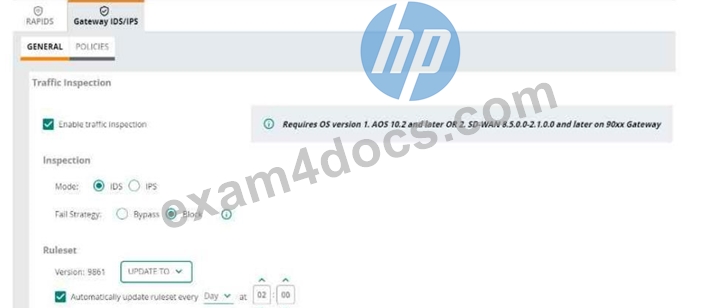
An HPE Aruba Networking 9x00 gateway is part of an HPE Aruba Networking Central group that has the settings shown in the exhibit. What would cause the gateway to drop traffic as part of its IDPS settings?
- A. Its IDPS engine failing
- B. Traffic matching a rule in the active ruleset
- C. Traffic showing anomalous behavior
- D. Its site-to-site VPN connections failing
Answer: B
Explanation:
1. IDPS Mode Configuration Overview
The exhibit shows the HPE Aruba Networking Central settings for the Gateway IDS/IPS configuration:
* Mode: Configured for Intrusion Prevention System (IPS), meaning that the gateway actively blocks traffic identified as threats.
* Fail Strategy: Configured to Block, meaning that if the gateway cannot determine the traffic's nature due to a system issue, it will block the traffic.
* Ruleset: The gateway uses a predefined set of intrusion detection/prevention rules (ruleset version
9861), which is updated automatically every day.
2. Traffic Evaluation in IPS Mode
In IPS mode, the gateway analyzes traffic against the active ruleset:
* If traffic matches a rule in the ruleset and is deemed malicious, the gateway will drop the traffic as part of its prevention mechanism.
* The ruleset defines specific conditions (e.g., signatures of known attacks, protocol anomalies) under which traffic should be blocked.
3. Explanation of Each Option
* A. Its site-to-site VPN connections failing:
* Incorrect:
* Site-to-site VPN connection issues do not directly trigger traffic drops under IDPS settings.
* IDPS is focused on detecting and preventing malicious activity, not general connectivity issues.
* B. Traffic matching a rule in the active ruleset:
* Correct:
* In IPS mode, the gateway drops traffic that matches any predefined rules in the active ruleset.
* For example, if traffic matches the signature of a known exploit or attack, it is immediately blocked.
* C. Its IDPS engine failing:
* Incorrect:
* The fail strategy determines how the gateway behaves in the event of an IDPS engine failure.
* In this case, the fail strategy is set to Block, but this applies only if the engine itself fails, not as a proactive traffic drop mechanism.
* D. Traffic showing anomalous behavior:
* Incorrect:
* While anomalous behavior may be logged or flagged, it does not necessarily lead to traffic drops unless it matches a specific rule in the active ruleset.
* Anomaly detection alone is not sufficient for IPS action without explicit rule matches.
Final Outcome:
Traffic is dropped only when it matches a rule in the active ruleset, ensuring targeted prevention of malicious activity.
References
* Aruba Gateway IDS/IPS Configuration Guide.
* Aruba Central Ruleset Management Documentation.
* Best Practices for Configuring Fail Strategies in IPS Mode.
NEW QUESTION # 82
A company has AOS-CX switches and HPE Aruba Networking ClearPass Policy Manager (CPPM).
The company wants switches to implement 802.1X authentication to CPPM and download user roles.
What is one task that you must complete on CPPM to support this use case?
- A. Create an admin account for the switch on CPPM with the HPE Aruba Networking User Role Download privilege level.
- B. Upload the switch TPM certificate as a trusted CA certificate with the Others usage.
- C. Export roles on CPPM to a file that uses XML format.
- D. Configure RADIUS enforcement profiles that specify the HPE-User-Role VSA.
Answer: D
Explanation:
* 802.1X and User Role Download:
* AOS-CX switches use RADIUS attributes to dynamically download user roles from CPPM.
* The HPE-User-Role VSA (Vendor-Specific Attribute) must be configured in the RADIUS enforcement profiles to specify which role the switch should apply.
* Option Analysis:
* Option A: Incorrect. Exporting roles in XML is not needed for dynamic role download.
* Option B: Incorrect. Switches authenticate via RADIUS, not admin accounts with specific privileges.
* Option C: Correct. RADIUS enforcement profiles must include the HPE-User-Role VSA to implement user role download.
* Option D: Incorrect. TPM certificates are unrelated to RADIUS-based user role downloads.
NEW QUESTION # 83
You have configured an AOS-CX switch to implement 802.1X on edge ports. Assume ports operate in the default auth-mode. VoIP phones are assigned to the "voice" role and need to send traffic that is tagged for VLAN 12. Where should you configure VLAN 12?
- A. As a trunk allowed VLAN on edge ports and the trunk native VLAN in the "voice" role.
- B. As the trunk native VLAN on edge ports and the trunk native VLAN on the "voice" role.
- C. As the trunk native VLAN in the "voice" role (and not in the edge port settings).
- D. As the allowed trunk VLAN in the "voice" role (and not in the edge port settings).
Answer: D
Explanation:
* Voice Role VLAN Configuration:
* When VoIP phones are authenticated and assigned to the "voice" role, VLAN 12 should be explicitly defined as an allowed trunk VLAN within the role configuration.
* The VLAN configuration should be role-specific rather than on the edge port, as this ensures dynamic VLAN assignment based on authentication results.
* Option Analysis:
* Option A: Incorrect. Native VLANs are for untagged traffic, but VoIP traffic is tagged.
* Option B: Correct. VLAN 12 must be configured as the allowed trunk VLAN in the "voice" role to tag VoIP traffic correctly.
* Option C: Incorrect. Configuring VLAN 12 in both edge port and role settings is redundant and unnecessary.
* Option D: Incorrect. Native VLANs do not handle tagged traffic like VLAN 12 for VoIP phones.
NEW QUESTION # 84
Which statement describes Zero Trust Security?
- A. Companies should focus on protecting their resources rather than on protecting the boundaries of their internal network.
- B. Companies must apply the same access controls to all users, regardless of identity.
- C. Companies can achieve zero trust security by strengthening their perimeter security to detect a wider range of threats.
- D. Companies that support remote workers cannot achieve zero trust security and must determine if the benefits outweigh the cost.
Answer: A
Explanation:
Zero Trust Security is a security model that operates on the principle that no entity, whether inside or outside the network, should be trusted by default. Instead, every access request is thoroughly verified before granting access to resources. This model emphasizes protecting resources rather than merely securing the network perimeter, acknowledging that threats can originate both inside and outside the network.
1.Resource Protection: Zero Trust focuses on securing individual resources, assuming that threats can bypass traditional perimeter defenses.
2.Verification: Every access request is authenticated and authorized regardless of the source, ensuring that only legitimate users can access sensitive resources.
3.Modern Security Approach: This model aligns with the evolving threat landscape where insider threats and advanced persistent threats are common.
NEW QUESTION # 85 
You have downloaded a packet capture that you generated on HPE Aruba Networking Central. When you open the capture in Wireshark, you see the output shown in the exhibit.
What should you do in Wireshark so that you can better interpret the packets?
- A. Edit preferences for IEEE 802.11 and chose to ignore the Protection bit with IV.
- B. Choose to decode UDP port 5555 packets as ARUBA_ERM and set the Aruba ERM Type to 0.
- C. Edit the Enabled Protocols and make sure that 802.11, GRE, and Aruba_ERM are enabled.
- D. Apply the following display filter: wlan.fc.type == 1.
Answer: B
Explanation:
To better interpret the packets shown in the Wireshark capture, you should choose to decode UDP port 5555 packets as ARUBA_ERM and set the Aruba ERM Type to 0. This configuration will allow Wireshark to properly decode and display the Aruba-specific encapsulated remote mirroring (ERM) packets, providing a clearer understanding of the traffic.
1.Decoding Protocols: Selecting the correct protocol decoding in Wireshark ensures that the captured packets are interpreted correctly, displaying the relevant information.
2.Aruba ERM: The packets in the capture are likely encapsulated remote mirroring (ERM) packets specific to Aruba, which require proper decoding settings in Wireshark.
3.Clear Interpretation: By setting the Aruba ERM Type to 0 and decoding the packets as ARUBA_ERM, you can view the encapsulated data accurately.
NEW QUESTION # 86
A company has HPE Aruba Networking APs running AOS-10 and managed by HPE Aruba Networking Central. The company also has AOS-CX switches. The security team wants you to capture traffic from a particular wireless client. You should capture this client's traffic over a 15 minute time period and then send the traffic to them in a PCAP file.
What should you do?
- A. Go to the client's AP in HPE Aruba Networking Central. Use the "Security" page to run a packet capture.
- B. Go to that client in HPE Aruba Networking Central. Use the "Live Events" page to run a packet capture.
- C. Access the CLI for the client's AP's switch. Set up a mirroring session between the AP's port and a management station running Wireshark.
- D. Access the CLI for the client's AP. Set up a mirroring session between its radio and a management station running Wireshark.
Answer: A
Explanation:
To capture traffic from a particular wireless client for a 15-minute period and then send the traffic in a PCAP file, you should go to the client's AP in HPE Aruba Networking Central and use the "Security" page to run a packet capture. This method allows you to directly capture the client's traffic from the AP managing the wireless connection, ensuring that you gather the relevant traffic data for analysis.
1.Centralized Management: HPE Aruba Networking Central provides a centralized interface for managing and monitoring APs, making it easy to initiate packet captures.
2.Security Page: The "Security" page in Aruba Central includes tools for running packet captures, allowing you to specify the duration and other parameters.
3.Ease of Use: This approach simplifies the process by using the built-in features of Aruba Central, avoiding the need for complex CLI commands or additional hardware.
NEW QUESTION # 87
You are using OpenSSL to obtain a certificate signed by a Certification Authority (CA). You have entered this command:
openssl req -new -out file1.pem -newkey rsa:3072 -keyout file2.pem
Enter PEM pass phrase: **********
Verifying - Enter PEM pass phrase: **********
Country Name (2 letter code) [AU]:US
State or Province Name (full name) [Some-State]:California
Locality Name (eg, city) []:Sunnyvale
Organization Name (eg, company) [Internet Widgits Pty Ltd]:example.com
Organizational Unit Name (eg, section) []:Infrastructure
Common Name (e.g. server FQDN or YOUR name) []:radius.example.com
What is one guideline for continuing to obtain a certificate?
- A. You should submit file2.pem, but not file1.pem, to the desired CA to sign.
- B. You should submit file1.pem, but not file2.pem, to the desired CA to sign.
- C. You should use a third-party tool to encrypt file2.pem before sending it and file1.pem to the CA.
- D. You should concatenate file1.pem and file2.pem into a single file, and submit that to the desired CA to sign.
Answer: B
Explanation:
When using OpenSSL to obtain a certificate signed by a Certification Authority (CA), you should submit the Certificate Signing Request (CSR) file, which is file1.pem, to the CA. The CSR contains the information about the entity requesting the certificate and the public key, but not the private key, which is in file2.pem.
The CA uses the information in the CSR to create and sign the certificate.
1.CSR Submission: The CSR (file1.pem) includes the public key and the entity information required by the CA to issue a certificate.
2.Private Key Security: The private key (file2.pem) should never be sent to the CA or shared; it remains securely stored on the requestor's server.
3.Certificate Issuance: After the CA signs the CSR, the resulting certificate can be used with the private key to establish secure communications.
NEW QUESTION # 88
A ClearPass Policy Manager (CPPM) service includes these settings:
* Role Mapping Policy:
* Evaluate: Select first
* Rule 1 conditions:
* Authorization:AD:Groups EQUALS Managers
* Authentication:TEAP-Method-1-Status EQUALS Success
* Rule 1 role: manager
Rule 2 conditions:
* Authentication:TEAP-Method-1-Status EQUALS Success
* Rule 2 role: domain-comp
Default role: [Other]
Enforcement Policy:
* Evaluate: Select first
* Rule 1 conditions:
* Tips Role EQUALS manager AND Tips Role EQUALS domain-comp
* Rule 1 profile list: domain-manager
Rule 2 conditions:
* Tips Role EQUALS manager
* Rule 2 profile list: manager-only
Rule 3 conditions:
* Tips Role EQUALS domain-comp
* Rule 3 profile list: domain-only
Default profile: [Deny access]
A client is authenticated by the service. CPPM collects attributes indicating that the user is in the Contractors group, and the client passed both TEAP methods.
Which enforcement policy will be applied?
- A. [Deny Access Profile]
- B. domain-only
- C. domain-manager
- D. manager-only
Answer: A
Explanation:
1. Understanding the Role Mapping Evaluation:
* Role mapping is set to "Evaluate: Select first," meaning the first rule that matches the client attributes will determine the role(s) assigned.
* Contractors group: Since the client is in the Contractors group (not Managers), Rule 1 in the Role Mapping Policy does not match.
* TEAP-Method-1-Status EQUALS Success: This condition matches Rule 2, so the client is assigned the domain-comp role.
* No other rules match, so the default role [Other] is not applied.
2. Resulting Role from Role Mapping Policy:
* The client is assigned the domain-comp role.
3. Enforcement Policy Evaluation:
* Enforcement policy is also set to "Evaluate: Select first," so the first matching rule determines the enforcement profile.
* Rule 1 (Tips Role = manager AND domain-comp):
* The client only has the domain-comp role, not manager, so this rule does not match.
* Rule 2 (Tips Role = manager):
* The client does not have the manager role, so this rule does not match.
* Rule 3 (Tips Role = domain-comp):
* This rule matches the client's role, but it is not evaluated because the enforcement policy already skipped to the default action after failing the first two rules.
4. Default Enforcement Profile:
* Since no rule explicitly matches and the policy evaluation stops at the default, the default profile [Deny Access Profile] is applied.
Final Outcome:
The client is denied access because none of the matching rules satisfy the conditions.
References
* Aruba ClearPass Policy Manager Role Mapping and Enforcement Policies Guide.
* Role and Policy Evaluation Logic for ClearPass Authentication Services.
NEW QUESTION # 89
You are setting up an HPE Aruba Networking VIA solution for a company. You have already created a VPN pool with IP addresses for the remote clients. During tests, however, the clients do not receive IP addresses from that pool.
What is one setting to check?
- A. That the pool is referenced in the clients' VIA Connection Profile
- B. That the pool uses an IP subnet that is different from any subnet configured on the VPNC
- C. That the pool uses valid, public IP addresses that are assigned to the company
- D. That the pool is associated with the role to which the VIA clients are being assigned
Answer: D
Explanation:
If VIA clients are not receiving IP addresses from the configured VPN pool, one setting to check is whether the pool is associated with the role to which the VIA clients are being assigned. The association between the IP pool and the role ensures that clients assigned to that role receive IP addresses from the correct pool.
1.Role Association: Each role can be associated with a specific IP pool, ensuring that clients assigned to the role receive addresses from the intended pool.
2.IP Allocation: Proper configuration of the IP pool and its association with the role is crucial for correct IP address allocation.
3.VIA Configuration: Ensuring that all settings, including IP pool associations, are correctly configured, facilitates seamless client connectivity.
NEW QUESTION # 90
A company wants to implement Virtual Network based Tunneling (VNBT) on a particular group of users and assign those users to an overlay network with VNI
3000.
Assume that an AOS-CX switch is already set up to:
. Implement 802.1X to HPE Aruba Networking ClearPass Policy Manager (CPPM)
. Participate in an EVPN VXLAN solution that includes VNI 3000
Which setting should you configure in the users' AOS-CX role to apply VNBT to them when they connect?
- A. Gateway zone set to "3000" with no gateway role set
- B. Gateway zone set to "vni-3000" with no gateway role set
- C. Access VLAN ID set to "3000"
- D. Access VLAN set to the VLAN mapped to VNI 3000
Answer: D
Explanation:
To apply Virtual Network based Tunneling (VNBT) to a particular group of users and assign them to an overlay network with VNI 3000, you should configure the users' AOS-CX role to set the Access VLAN to the VLAN mapped to VNI 3000. This ensures that when users connect, their traffic is tunneled through the specified VNI, integrating seamlessly with the EVPN VXLAN solution.
1.Access VLAN Configuration: Setting the Access VLAN to the VLAN mapped to VNI 3000 ensures that users' traffic is directed to the correct virtual network.
2.EVPN VXLAN Integration: This setup allows the AOS-CX switch to participate in the EVPN VXLAN solution, ensuring that user traffic is properly encapsulated and tunneled.
3.Role-Based Assignment: Configuring the role with the correct VLAN mapping ensures that users are dynamically assigned to the appropriate virtual network based on their role.
NEW QUESTION # 91
A company has Aruba APs that are controlled by Central and that implement WIDS. When you check WIDS events, you see a "detect valid SSID misuse" event. What can you interpret from this event, and what steps should you take?
- A. Hackers are likely trying to pose as authorized APs. You should use the detecting radio information and immediately track down the device that triggered the event.
- B. Admins have likely misconfigured SSID security settings on some of the company's APs. You should have them check those settings.
- C. Clients are failing to authenticate to corporate SSIDs. You should first check for misconfigured authentication settings and then investigate a possible threat.
- D. This event might be a threat but is almost always a false positive. You should wait to see the event over several days before following up on it.
Answer: A
Explanation:
The "Detect Valid SSID Misuse" event in Aruba's Wireless Intrusion Detection System (WIDS) indicates that a valid SSID, associated with your network, is being broadcast from an unauthorized source. This scenario often signals a potential rogue access point attempting to deceive clients into connecting to it (e.g., for credential harvesting or man-in-the-middle attacks).
1. Explanation of Each Option
A: Clients are failing to authenticate to corporate SSIDs. You should first check for misconfigured authentication settings and then investigate a possible threat:
* Incorrect:
* This event is not related to authentication failures by legitimate clients.
* Misconfigured authentication settings would lead to events like "authentication failures" or
"radius issues," not "valid SSID misuse."
B: Admins have likely misconfigured SSID security settings on some of the company's APs. You should have them check those settings:
* Incorrect:
* This event refers to an external device broadcasting your SSID, not misconfiguration on the company's authorized APs.
* WIDS differentiates between valid corporate APs and rogue APs.
C: Hackers are likely trying to pose as authorized APs. You should use the detecting radio information and immediately track down the device that triggered the event:
* Correct:
* This is the most likely cause of the "detect valid SSID misuse" event. A rogue AP broadcasting a corporate SSID could lure clients into connecting to it, exposing sensitive credentials or traffic.
* Immediate action includes:
* Using the radio information from the event logs to identify the rogue AP's location.
* Physically locating and removing the rogue device.
* Strengthening WIPS/WIDS policies to prevent further misuse.
D: This event might be a threat but is almost always a false positive. You should wait to see the event over several days before following up on it:
* Incorrect:
* While false positives are possible, "valid SSID misuse" is a critical security event that should not be ignored.
* Delaying action increases the risk of successful attacks against your network.
2. Recommended Steps to Address the Event
* Review Event Logs:
* Gather details about the rogue AP, such as SSID, MAC address, channel, and signal strength.
* Locate the Rogue Device:
* Use the detecting AP's radio information and signal strength to triangulate the rogue AP's physical location.
* Respond to the Threat:
* Remove or disable the rogue device.
* Notify the security team for further investigation.
* Prevent Future Misuse:
* Strengthen security policies, such as enabling client whitelists or enhancing WIPS protection.
References
* Aruba WIDS/WIPS Configuration and Best Practices Guide.
* Aruba Central Security Event Analysis Documentation.
* Wireless Threat Management Using Aruba Networks.
NEW QUESTION # 92
A company has HPE Aruba Networking Central-managed APs. The company wants to block all clients connected through the APs from using YouTube.
Which steps should you take?
- A. Enable WebCC on all client firewall roles. Then, create WebCC category rules that deny suspicious URLs.
- B. Enable Client IPS at the "custom" level, and then specify the check for YouTube.
- C. Deploy gateways and have the APs tunnel traffic to the gateways. Then, enable the gateway IDS/IPS engine.
- D. Enable DPI. Then, create application rules to deny YouTube on the firewall roles.
Answer: D
Explanation:
To block all clients connected through HPE Aruba Networking Central-managed APs from accessing YouTube, you should enable DPI (Deep Packet Inspection) and then create application rules to deny YouTube on the firewall roles. DPI allows the network to inspect and classify traffic based on application signatures, making it possible to enforce application-specific policies. By creating rules that specifically block YouTube traffic, you can effectively prevent clients from accessing the service.
NEW QUESTION # 93
HPE Aruba Networking ClearPass Policy Manager (CPPM) uses a service to authenticate clients. You are now adding the Endpoints Repository as an authorization source for the service, and you want to add rules to the service's policies that apply different access levels based, in part, on a client's device category. You need to ensure that CPPM can apply the new correct access level after discovering new clients' categories.
What should you enable on the service?
- A. The Profile Endpoints option in the Service tab
- B. The Posture Compliance option in the Service tab
- C. The Audit End-host option in the Service tab
- D. The Use cached Roles and Posture attributes from previous sessions option in the Enforcement tab
Answer: A
Explanation:
To ensure that HPE Aruba Networking ClearPass Policy Manager (CPPM) can apply the correct access levels based on a client's device category after discovering new clients, you need to enable the "Profile Endpoints" option in the Service tab. This option allows CPPM to profile and categorize endpoints dynamically, ensuring that the appropriate access levels are applied based on the device's characteristics.
Enabling this feature ensures that new devices are accurately profiled and that access policies can be enforced based on the updated device information.
NEW QUESTION # 94
A company needs to enforce 802.1X authentication for its Windows domain computers to HPE Aruba Networking ClearPass Policy Manager (CPPM). The company needs the computers to authenticate as both machines and users in the same session.
Which authentication method should you set up on CPPM?
- A. EAP-TTLS
- B. EAP-TLS
- C. TEAP
- D. PEAP MSCHAPv2
Answer: C
Explanation:
To enforce 802.1X authentication for Windows domain computers to HPE Aruba Networking ClearPass Policy Manager (CPPM) and have the computers authenticate as both machines and users in the same session, you should set up TEAP (Tunneled EAP) as the authentication method. TEAP supports both machine and user authentication within a single 802.1X session, making it suitable for scenarios where both types of authentication are required simultaneously.
NEW QUESTION # 95
You are establishing a cluster of HPE Aruba Networking ClearPass servers. (Assume that they are running version 6.9.).
For which type of certificate is it recommended to install a CA-signed certificate on the Subscriber before it joins the cluster?
- A. RADIUS/EAP
- B. RadSec
- C. HTTPS
- D. Database
Answer: C
Explanation:
When setting up a ClearPass cluster, it is critical to ensure secure communication between the cluster nodes and the client devices. For this purpose, certain certificates must be properly configured.
1. Why HTTPS Requires a CA-Signed Certificate?
* HTTPS communication is used for inter-cluster communication and for the web-based user interface that administrators use to manage the ClearPass cluster.
* Before joining the cluster, it is strongly recommended to install a CA-signed HTTPS certificate on the Subscriber to ensure secure communication and prevent warnings/errors due to untrusted certificates.
* Without a CA-signed certificate, the Subscriber might use a self-signed certificate, leading to security risks and lack of trust validation.
2. Analysis of Other Certificate Types
* B. Database:
* Incorrect: Database communications within ClearPass clusters are secured using internal certificates or keys. These are not user-facing and do not require a CA-signed certificate before joining the cluster.
* C. RADIUS/EAP:
* Incorrect: RADIUS/EAP certificates are important for client authentication, but they are not required on the Subscriber prior to cluster joining. These can be configured after the Subscriber is part of the cluster.
* D. RadSec:
* Incorrect: RadSec is an optional feature for secure RADIUS communication over TLS, and its certificate configuration is typically performed post-cluster setup.
Final Recommendation
To ensure secure cluster operations and seamless web-based management, a CA-signed HTTPS certificate should be installed on the Subscriber before it joins the ClearPass cluster.
References
* ClearPass Deployment Guide for Version 6.9.
* Best Practices for Certificate Management in ClearPass Clusters.
* HPE Aruba ClearPass Cluster Configuration Guide.
NEW QUESTION # 96
You have created a Web-based Health Check Service that references a posture policy. You want the service to trigger a RADIUS change of authorization (CoA) when a client receives a Healthy or Quarantine posture. Where do you configure those rules?
- A. In the posture policy
- B. In the Agents and Software Updates > OnGuard Settings
- C. In a RADIUS enforcement policy
- D. In a WEBAUTH enforcement policy
Answer: C
Explanation:
* RADIUS Change of Authorization (CoA):
* CoA is triggered when ClearPass determines that a client's posture status has changed (e.g., Healthy, Quarantine).
* The RADIUS enforcement policy is where you configure actions and enforcement profiles that respond to these posture changes.
* Option Analysis:
* Option A: Correct. RADIUS enforcement policies are used to configure actions, including triggering CoA.
* Option B: Incorrect. OnGuard settings configure posture agent behavior, not enforcement rules.
* Option C: Incorrect. The posture policy evaluates compliance but does not trigger CoA.
* Option D: Incorrect. WEBAUTH enforcement policies are for web-based authentication, not posture-related CoA.
NEW QUESTION # 97
A company wants to turn on Wireless IDS/IPS infrastructure and client detection at the high level on HPE Aruba Networking APs. The company does not want to enable any prevention settings.
What should you explain about HPE Aruba Networking recommendations?
- A. HPE Aruba Networking recommends using hybrid AP mode, as opposed to Air Monitors (AMs), when implementing detection without prevention.
- B. HPE Aruba Networking recommends turning on both wired and wireless prevention whenever you enable detection at high.
- C. HPE Aruba Networking recommends disabling client detection when you configure infrastructure detection at high, as infrastructure detection includes all the client checks and more.
- D. HPE Aruba Networking recommends configuring infrastructure and client detection at a custom level and disabling or tuning some of the settings that are likely to produce false positives.
Answer: D
Explanation:
When enabling Wireless IDS/IPS infrastructure and client detection at a high level on HPE Aruba Networking APs without enabling prevention settings, HPE Aruba Networking recommends configuring detection at a custom level and adjusting settings to minimize false positives. This approach allows for effective monitoring while reducing the risk of unnecessary alerts and maintaining the accuracy of detections.
1.Custom Level Configuration: By customizing the detection settings, you can tailor the system to your specific environment, ensuring that only relevant threats are detected and reducing false positives.
2.False Positive Reduction: Disabling or tuning settings that are likely to produce false positives helps in maintaining the reliability of the detection system and prevents alert fatigue.
3.Focused Detection: Custom configuration ensures that the IDS/IPS focuses on critical detections, improving overall security posture.
NEW QUESTION # 98
A company has HPE Aruba Networking infrastructure devices. The devices authenticate clients to HPE Aruba Networking ClearPass Policy Manager (CPPM). You want CPPM to track information about clients, such as their IP addresses and their network bandwidth utilization. What should you set up on the network infrastructure devices to help that happen?
- A. Dynamic authorization enabled in the RADIUS settings for CPPM.
- B. An IF-MAP interface with CPPM as the destination.
- C. Logging with CPPM configured as a Syslog server.
- D. RADIUS accounting to CPPM, including interim updates.
Answer: D
Explanation:
* RADIUS Accounting:
* RADIUS accounting enables network devices to report client session details (e.g., IP addresses, session duration, bandwidth usage) to CPPM.
* Interim updates ensure CPPM receives ongoing updates about the client's session, enabling accurate tracking.
* Option Analysis:
* Option A: Incorrect. Syslog logging sends general system logs, not client session details.
* Option B: Incorrect. Dynamic authorization (CoA) handles session changes but does not provide usage tracking.
* Option C: Correct. RADIUS accounting with interim updates tracks client IP addresses and bandwidth utilization.
* Option D: Incorrect. IF-MAP interfaces are used for metadata sharing, not for RADIUS-based tracking.
NEW QUESTION # 99
What is a benefit of Online Certificate Status Protocol (OCSP)?
- A. It lets a device determine whether to trust a certificate without needing any root certificates installed.
- B. It lets a device download all the serial numbers for certificates revoked by a CA at once.
- C. It lets a device dynamically renew its certificate before the certificate expires.
- D. It lets a device query whether a single certificate is revoked or not.
Answer: D
Explanation:
* OCSP (Online Certificate Status Protocol):
* OCSP allows a device to check the revocation status of a specific certificate in real-time by querying the Certificate Authority (CA).
* This is more efficient than downloading an entire Certificate Revocation List (CRL), as it only checks the status of one certificate.
* Option Analysis:
* Option A: Incorrect. Root certificates are still required to validate the CA issuing the certificate.
* Option B: Correct. OCSP checks the status of a single certificate for revocation.
* Option C: Incorrect. Downloading all serial numbers is a function of a CRL, not OCSP.
* Option D: Incorrect. OCSP does not handle certificate renewal; it only checks for revocation.
NEW QUESTION # 100 
(Note that the HPE Aruba Networking Central interface shown here might look slightly different from what you see in your HPE Aruba Networking Central interface as versions change; however, similar concepts continue to apply.) An HPE Aruba Networking 9x00 gateway is part of an HPE Aruba Networking Central group that has the settings shown in the exhibit. What would cause the gateway to drop traffic as part of its IDPS settings?
- A. Its IDPS engine failing
- B. Traffic matching a rule in the active ruleset
- C. Traffic showing anomalous behavior
- D. Its site-to-site VPN connections failing
Answer: B
Explanation:
In the exhibit, the HPE Aruba Networking Central settings for the 9x00 gateway show that traffic inspection is enabled, and the gateway is set to operate in IDS (Intrusion Detection System) mode with the fail strategy set to "Block". This configuration means that the gateway will drop traffic if it matches a rule in the active ruleset.
1.Active Ruleset: The ruleset version 9861 is active, and the gateway is configured to automatically update the ruleset daily.
2.Traffic Matching Rules: When traffic matches a rule in the active ruleset, it is flagged as suspicious or malicious.
3.Block Mode: Since the fail strategy is set to "Block", any traffic that matches a rule in the active ruleset will be dropped to prevent potential threats.
NEW QUESTION # 101
......
Achieve Success in Actual HPE7-A02 Exam HPE7-A02 Exam Dumps: https://braindumps.exam4docs.com/HPE7-A02-study-questions.html
